MOONLAND
Contact联系
Case 01 · Yuque (Ant Group) · Editor & knowledge base · 2021–2023案例 01 · 语雀(蚂蚁集团)· 编辑器与知识库 · 2021–2023

An editor that takes the
pressure off writing.

一个把写作压力
分时卸下的编辑器

Yuque is Ant Group's documents and knowledge-base product, used by millions of writers and thousands of teams. For two years I owned the editor's core experience: block-level editing, a keyboard-first command system, feature cards, and the framework that turns a single document into an organized body of knowledge.语雀是蚂蚁集团的文档与知识库产品,服务数百万写作者与数千团队。两年间我主导编辑器核心体验:块级编辑、全键盘指令体系、特色卡片,以及把「一篇文档」升级为「一套可组织的知识」的一体化框架。

Role角色

Product manager & product designer, editor编辑器产品经理 / 产品设计

Scope范围

Block editing · keyboard & commands · feature cards · knowledge network · UI standards块编辑 · 键盘与指令 · 特色卡片 · 知识网络 · UI 标准

Platforms平台

Web, desktop, mobileWeb、桌面端、移动端

Evidence佐证

Public help docs I wrote under the pen name 幕阑, linked below以「幕阑」署名的公开帮助文档,见文末链接

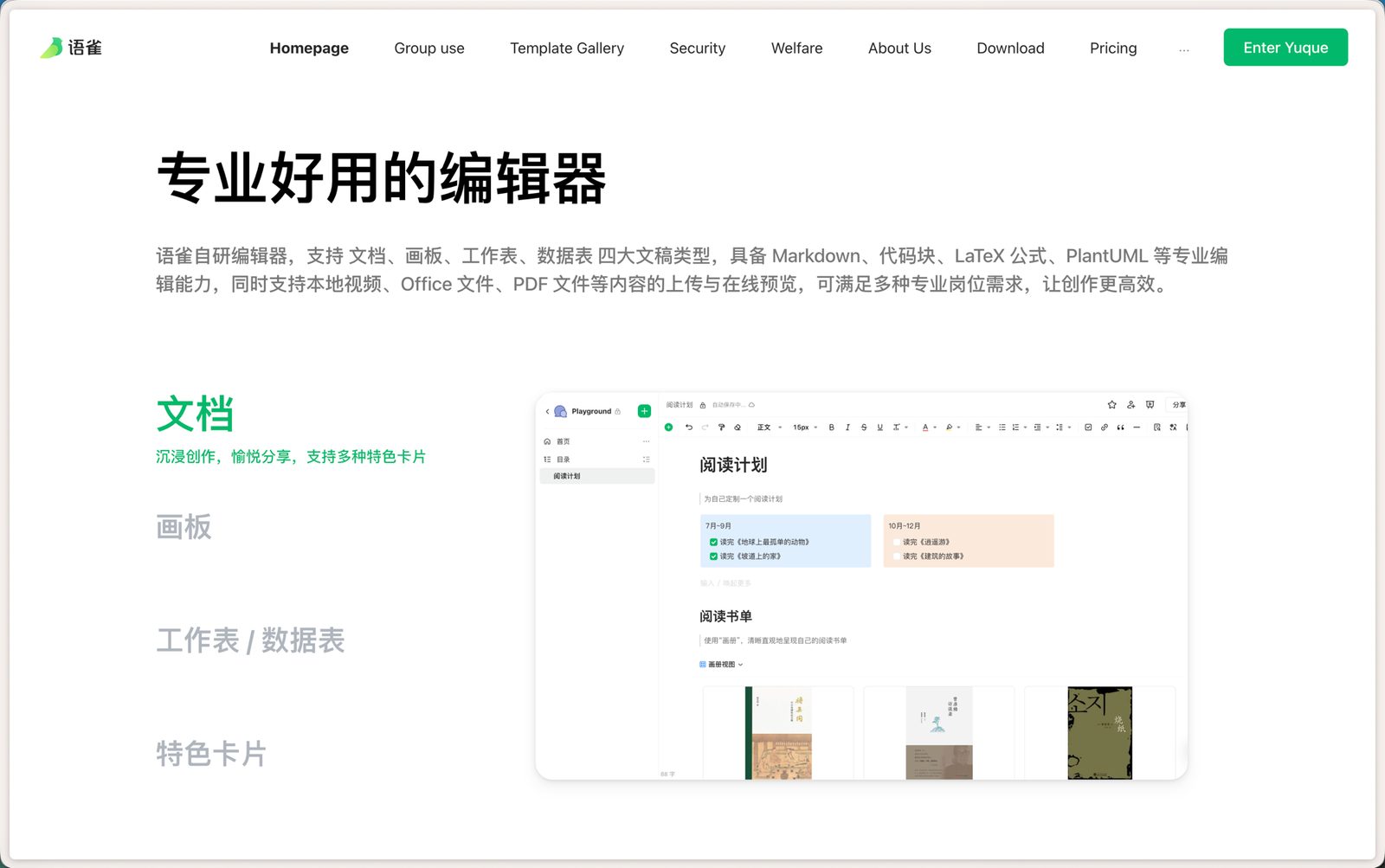
Yuque's editor page: documents, boards, sheets and feature cards
Yuque today (yuque.com/about): one editor for documents, boards, sheets and data tables, with feature cards as a first-class content type.今天的语雀(yuque.com/about):一个编辑器承载文档、画板、工作表与数据表,特色卡片是一等内容类型。
Context背景

Character-level editing was polished. It was also the ceiling.

字符级编辑已经打磨得很好,但它也是天花板

Where we were当时的状态

Yuque's editor was excellent at character-level editing: precise selections, rich formatting, a mature toolbar. But every layout decision still ran through the mouse, and every new capability added another button. Notion, Feishu and Craft had moved to block-level editing, where the unit of manipulation is a paragraph, a list, an image, not a cursor position.语雀编辑器在字符级编辑上已经很出色:精确选区、丰富格式、成熟的工具栏。但每一个排版决定仍然要经过鼠标,每新增一项能力就多一个按钮。Notion、飞书、Craft 都已转向块级编辑:操作的单位是一个段落、一个列表、一张图,而不是光标位置。

I benchmarked the block behaviors of five products (create, drag, convert, comment, nest, share) and found Yuque was missing exactly the operations that make arranging content feel cheap.我对比了五款产品的块行为(新建、拖拽、转化、评论、嵌套、分享),发现语雀缺的恰恰是让「编排」变得轻松的那些操作。
What a good editor owes its user好编辑器欠用户的四件事

  • 1A stable environment to create in.稳定的创作环境。
  • 2Input that matches how people already type, speak, paste and import.符合用户已有习惯的输入方式:打字、口述、粘贴、引入。
  • 3Efficient habits that are easy to learn and easy to remember.容易习得、容易记住的高效操作习惯。
  • 4An immersive atmosphere that gets out of the way.沉浸、不打扰的创作氛围。

Positioning call: not "Notion for China". Yuque should stay light and efficient: fewer visible controls, more capability behind the keyboard.定位判断:不做「中国版 Notion」。语雀应该保持轻量高效:更少的可见控件,更多藏在键盘后面的能力。

The thesis核心主张

Borrow an idea from telecom: time-division the pressure of writing.

借一个通信概念:把写作压力时分复用

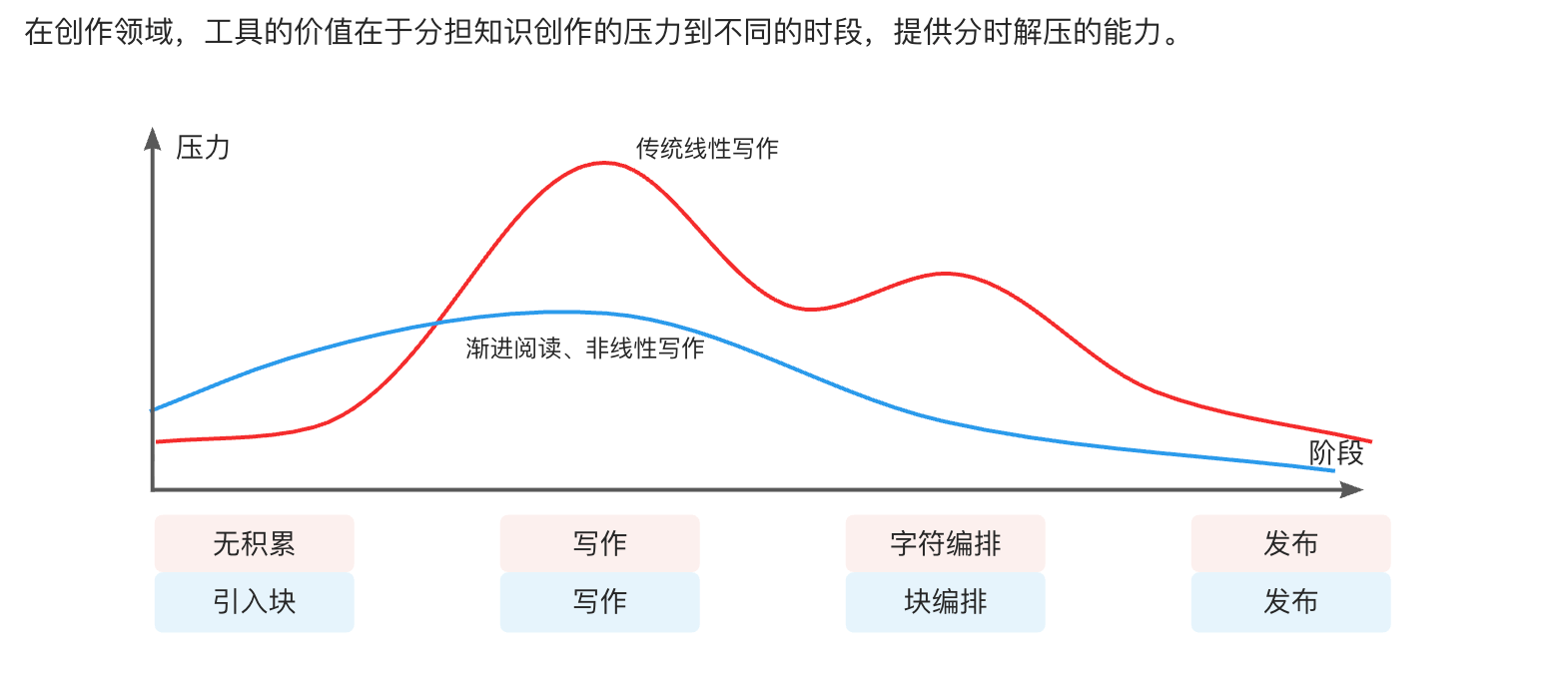
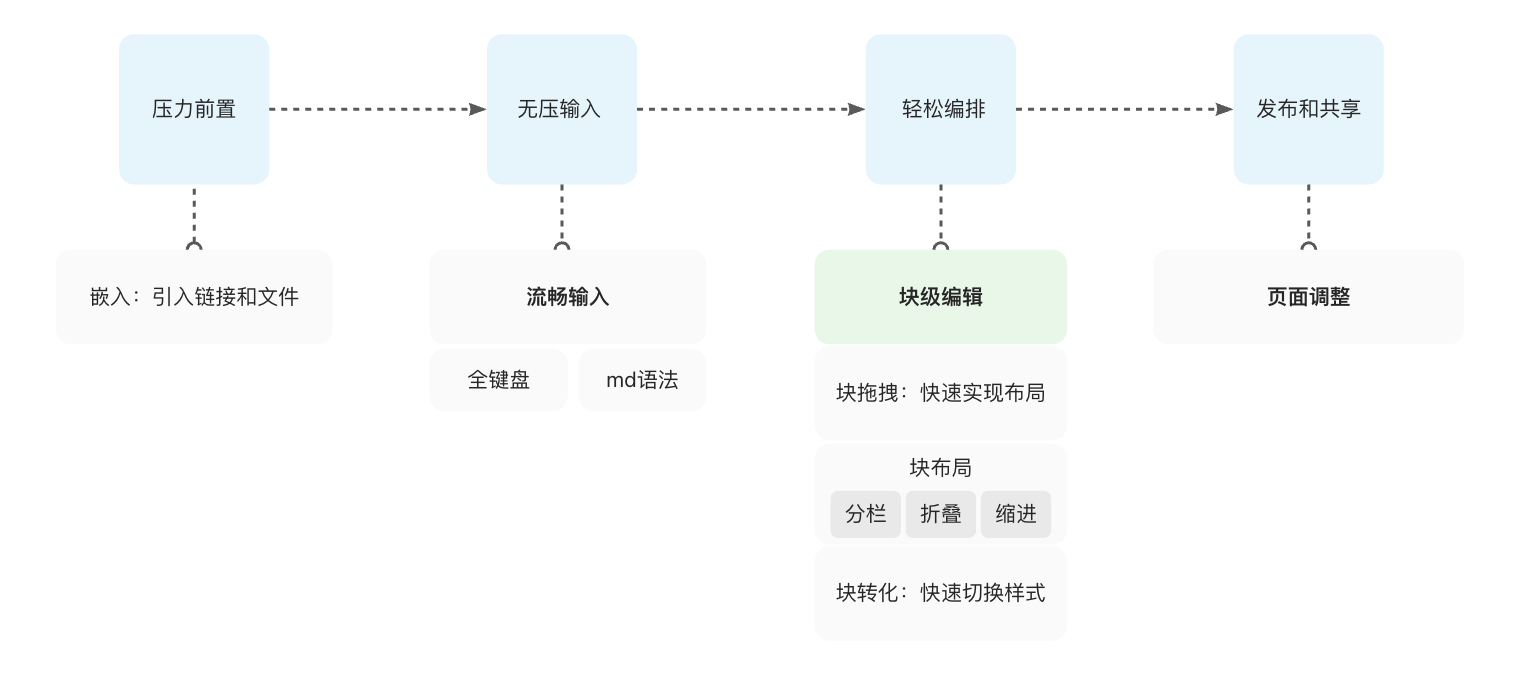
In time-division multiplexing, one channel serves many devices by giving each its own slot. A writing tool earns its value the same way: by distributing the pressure of knowledge creation across different moments instead of concentrating it on the blank page. I turned that into a four-stage model and mapped every editor capability onto it.时分复用让一条通道轮流服务多台设备。写作工具的价值也一样:把知识创作的压力分配到不同时段,而不是全压在面对白纸的那一刻。我把它变成一个四阶段模型,再把编辑器的每项能力对应上去。

Writing pressure over time: linear writing vs. block-based non-linear writing
The thesis in one chart: linear writing piles pressure onto the drafting stage; block-based, non-linear writing spreads it out.一张图说清主张:线性写作把压力堆在起草阶段,块级的非线性写作把压力摊平。
Four stages: front-load pressure, pressure-free input, effortless arrangement, publish and share
Front-load → Input without pressure → Arrange with ease → Publish. Block editing lives in stage three, which is where the pain used to peak.压力前置 → 无压输入 → 轻松编排 → 发布共享。块编辑落在第三阶段,正是过去压力最高的地方。
What I designed设计了什么

Four capabilities, one command system.

四项能力,一套指令体系

01

Block-level editing: make layout a drag, not a negotiation块级编辑:让排版变成一次拖拽,而不是一场拉锯

Every paragraph, list, image and card became a block with a handle. Dragging a block onto another creates columns; dragging into a heading folds it; dragging sideways indents. Block conversion switches a selection between styles in one move. The rule I held: a block operation must be doable with a fingertip, so the same model works on mobile where precise selection fails.每个段落、列表、图片和卡片都成为带手柄的块。拖到另一块旁边生成分栏,拖进标题即折叠,横向拖动即缩进。块转化一步切换选中内容的样式。我坚持的规则:块操作必须能用一根手指完成,这样同一套模型在精确选区失效的移动端也能成立。

  • Block drag: order, columns, fold, indent块拖拽:排序、分栏、折叠、缩进
  • Block convert: paragraph ↔ list ↔ quote ↔ card, without retyping块转化:段落 ↔ 列表 ↔ 引用 ↔ 卡片,不需要重新输入
  • Block link & comment: a block is an addressable unit, not just text块链接与块评论:块是可寻址的单位,而不只是一段文字
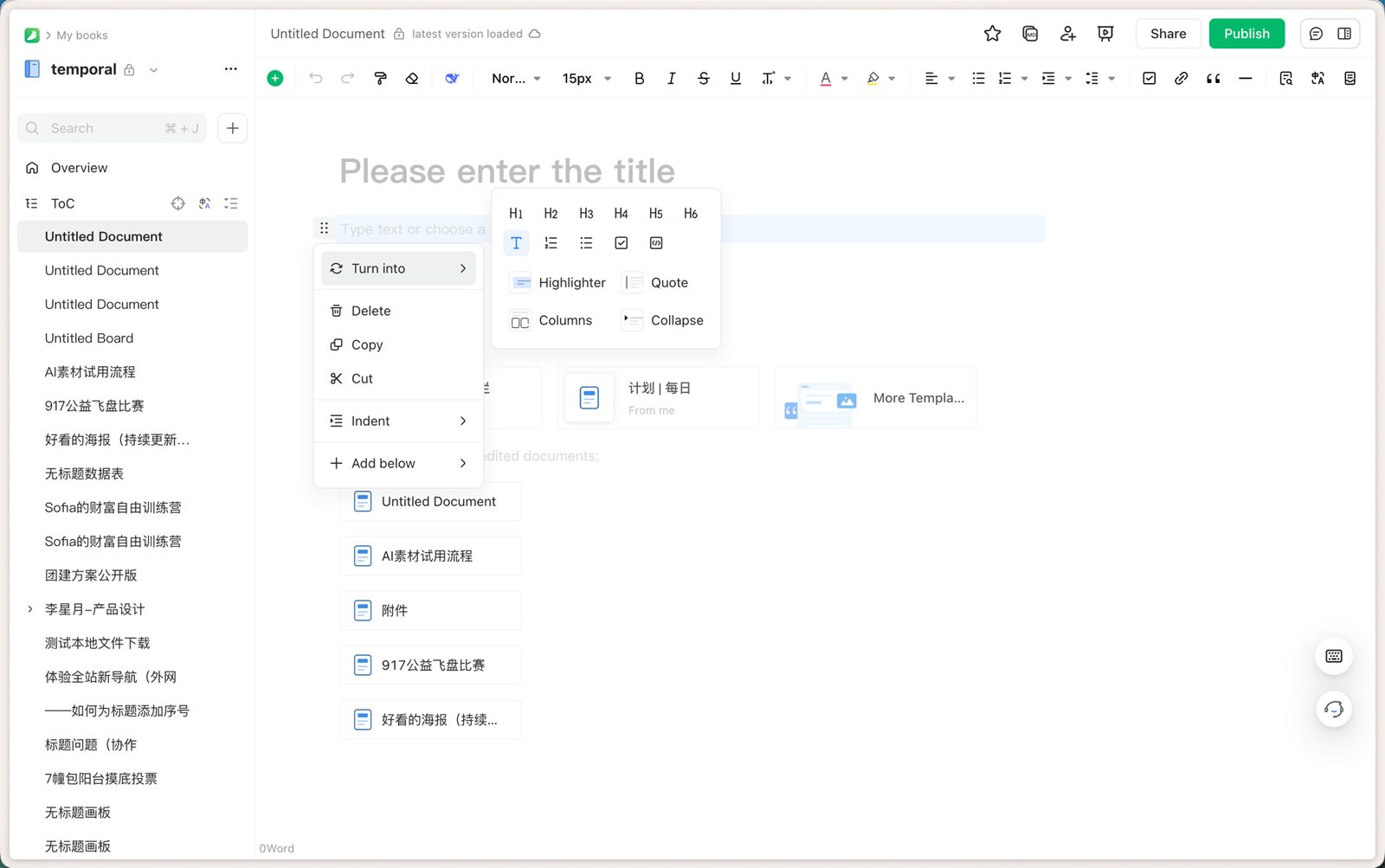
The block handle menu in Yuque: turn into, delete, copy, cut, indent, add below
The block handle as shipped: one menu for "turn into" (headings, lists, code, highlighter, quote, columns, collapse), delete, copy, cut, indent and add below.上线后的块手柄:一个菜单覆盖「转化」(标题、列表、代码、高亮、引用、分栏、折叠)、删除、复制、剪切、缩进与在下方添加。
02

Keyboard-first: collapse mouse-heavy formatting into memorable commands全键盘操作:把靠鼠标的高频排版动作收敛为可记忆的指令

Markdown syntax for the fluent, a slash menu (快捷指令) for everyone else, and a shortcut system designed as a vocabulary rather than a list: the same modifier logic across headings, lists, cards and blocks so that learning one command teaches the next. The measure of success was simple: could a heavy user write and lay out an entire document without touching the mouse?熟手用 Markdown 语法,其他人用「/」快捷指令菜单,快捷键则设计成一套词汇而不是一张清单:标题、列表、卡片、块共用同一套修饰键逻辑,学会一个就等于学会下一个。成功标准很简单:重度用户能否全程不碰鼠标写完并排好一篇文档?

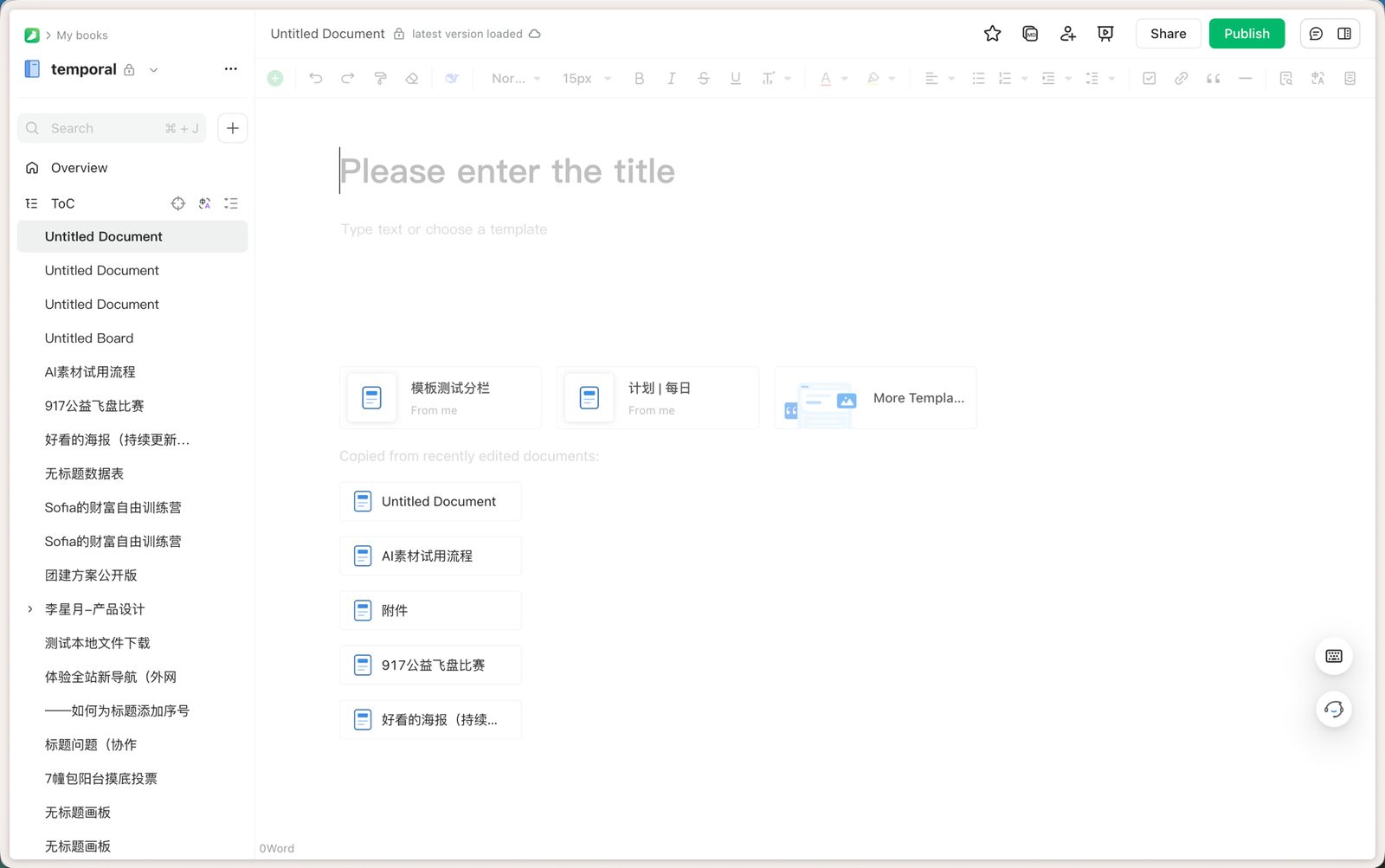
Yuque editor with toolbar and template suggestions on a blank document
A blank document: the toolbar is there for discovery, but every control on it is also a shortcut or a slash command. Templates and recent documents fill the blank page before the user has to.一篇空白文档:工具栏用于发现功能,但上面每个控件都有对应的快捷键或斜杠指令。模板与最近文档在用户动手之前就填上了白纸。
03

Feature cards: give structured content a first-class block特色卡片:给结构化内容一个正式的块

Callouts, collapsibles, columns, embedded files and links, image galleries, data tables, and small live apps such as polls, check-ins and calendars were unified as cards: one creation path (the plus panel or a slash command with a memorable pinyin shortcut such as /hb for whiteboard, /fl2 for two columns), consistent selection and drag behavior, one settings panel. A poll or check-in stays interactive for readers, so a document can carry a small application inside it. Users stopped pasting screenshots to get a layout and started composing with cards. This is also the "embed" stage of the model: front-loading pressure by pulling in what already exists.高亮块、折叠块、分栏、嵌入文件与链接、图册、数据表,以及投票、打卡、日历这类小应用被统一为卡片:一条创建路径(加号面板,或带拼音缩写的斜杠指令,如 /hb 画板、/fl2 两栏),一致的选中与拖拽行为,一个设置面板。投票和打卡在阅读端仍然可交互,一篇文档因此可以装下一个小应用。用户不再为了一个版式去贴截图,而是用卡片来组织内容。这也是模型里的「嵌入」阶段:把已有的东西引进来,把压力前置。

04

Knowledge network: from "a document" to "a body of knowledge"知识网络:从「一篇文档」到「一套知识」

Knowledge bases are trees. Human memory is a network. My concept paper argued that no user will dutifully walk the "note → document → knowledge base → permissions" path from the manual, so the product should let links form as a by-product of writing: paste a Yuque link and choose its form (plain, title, card, embed), @-mention a document, or pull in a fragment with a slash command. Published pages then show what they reference and what references them. I drove the integration of the editor and the knowledge base into one framework so that a team's knowledge stops being a folder of files and becomes a graph you can write into.知识库是树,人脑是网。我的构想文档里论证过:没有用户会老老实实按手册走完「小记 → 文档 → 知识库 → 权限」这条链路,所以产品应该让关联成为写作的副产物:粘贴一个语雀链接并选择它的形态(原链接、标题、卡片、嵌入),@ 提及一篇文档,或用斜杠引入一个片段。发布后的页面会显示它引用了什么、被谁引用。我推动编辑器与知识库合并为一套框架,让团队知识不再是一个文件夹,而是一张可以直接写进去的网。

Outcome结果

Fewer visible controls. More done per keystroke.

更少的可见控件,每一次击键做更多事

The command system shipped as Yuque's official editing model and is documented in the public help center under my pen name. Mouse-dependent formatting collapsed into a memorable set of commands, which lowered the learning curve for new writers and the cost of organizing content for teams. The product's "light and efficient" positioning was backed by a UI and interaction standard so that fast iteration did not erode consistency.这套指令体系成为语雀正式的编辑模型,并以我的笔名记录在公开帮助中心。依赖鼠标的排版动作收敛为一组可记忆的指令,降低了新写作者的学习曲线,也降低了团队组织内容的成本。「轻量高效」的产品定位有一套 UI 与交互标准做支撑,快速迭代没有侵蚀一致性。

This is the PLG path in its purest form: no salesperson explains the editor; the editor explains itself.这是最纯粹的 PLG 路径:没有销售来解释编辑器,编辑器自己解释自己。

"The value of a creative tool is to share out the pressure of knowledge work across different moments, and give people a way to decompress at each one."「在创作领域,工具的价值在于分担知识创作的压力到不同的时段,提供分时解压的能力。」

From my design note on block editing, 2022摘自我 2022 年的块编辑设计笔记

Next case下一个案例 DeepInsight — a BI platform for analysts who aren't analysts →DeepInsight——给「非分析师」用的 BI 平台 →